















For event photographers

The event ends at 11.The gallery is readyby morning.

Your client wants highlights first thing. Upload the whole night before bed and wake up to a draft gallery, ready for your review.

Your first event is on us: 5,000 photos culled, 500 edited. No card to start.

Thursday · 23:52Thu 23:52You press startStart
Friday · 07:10Fri 07:10Ready for your reviewReview
A crowd cheering under falling confetti at an evening gala
Harbor & Co.Annual gala
318 photos, in your brandSampleDraft · ready for your review
How it works

The whole night culled, edited and built into a gallery by morning. You make the final call.

  1. 01The cull

    Start from a shortlist.

    Bring every card from the night. ShotBreak stacks the near-duplicates, like forty frames of one handshake, and picks a keeper from each.

    Change any pick you disagree with

  2. 02The edit
    Guests raising a toast, shown as shot and with a finishing look appliedAs shotHearth

    One look, the whole night.

    One finishing look goes on every keeper, so the stage, the dinner and the dance floor read as one set.

    Choose your own look, or take the suggested one

  3. 03The gallery

    Built in your brand.

    The keepers become a gallery with the event on the cover and your name at the top. It waits for you as a draft.

    You choose when it goes out

Start freeNo card to start. Cancel anytime.

See it working

Don’t take our word for it. Take the tour.

The real ShotBreak opens right here, with a sample studio in it, and a voice walks you through it. No sign-up, nothing to install.

What the client opens

One link for the client, and everyone who was there.

The event’s name on the cover, your brand on every page. The client’s team and the guests open it on any phone to pick favorites and download, with no app and no account.

  • A sample client gallery in the Clean & Simple look, on a computer

    Clean & Simple

  • A sample client gallery in the Warm Romance look, on a phone

    Warm Romance

  • A sample client gallery in the Studio Grey look, on a computer

    Studio Grey

  • A sample client gallery in the Editorial look, on a phone

    Editorial

  • A sample client gallery in the Game Day look, on a phone

    Game Day

  • A sample client gallery in the Light & Airy look, on a computer

    Light & Airy

  • A sample client gallery in the Forest look, on a phone

    Forest

  • A sample client gallery in the Modern Grid look, on a computer

    Modern Grid

  • A sample client gallery in the Exhibition look, on a computer

    Exhibition

  • A sample client gallery in the Timeless Classic look, on a phone

    Timeless Classic

  • A sample client gallery in the Darkroom look, on a computer

    Darkroom

  • A sample client gallery in the Linen look, on a phone

    Linen

Sample galleries
After the event

Delivered the way the client’s team needs it. Invoiced the same morning.

Corporate clients ask for the same things after every event: a few photos early, a private link, files in the right size. Then you invoice them and keep them for the next one.

  • Sample
    A few photos early

    Highlights first

    Publish a small gallery the next morning so the client has photos to share, then add the rest. The link you sent stays the same.

  • Sample
    Internal events

    A private gallery

    Add a password, or make it invite-only so only the people you invite by email can open it.

  • Sample
    Files for the team

    Downloads, your way

    Turn downloads on or off, choose web or original size, and add your watermark if you want it.

  • The client pays

    Paid by card

    Send the invoice from the same place as the gallery. The client pays on a simple page by card and the money lands in your Stripe account.

  • Sample
    Repeat clients

    One contact per client

    The gala, the quarterly and the holiday party sit on one contact, each with its invoice and its gallery.

  • Sample
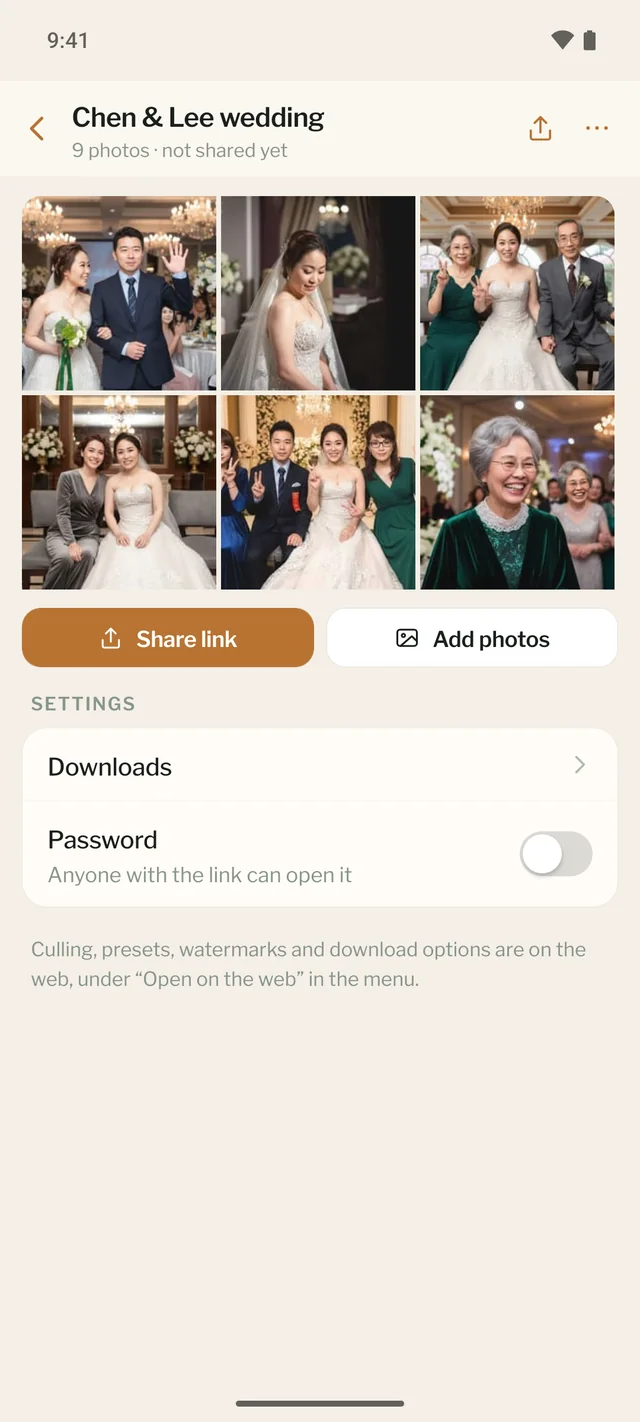
    A gallery in the ShotBreak app, with Share link and Add photos
    ShotBreak on your phone

    Send the link from anywhere

    Share a gallery link, answer the client and check on an invoice from your phone.

    Download on the App StoreGet it on Google Play
Start freeNo card to start. Cancel anytime.
A couple in a golden field
Our one promise

Your photos are not training data.And they never will be.

Never trained on your photographs

Everything you upload is covered, from a whole shoot to a finished gallery.

Never sold or licensed to anyone who would

Photos you deliver through ShotBreak stay yours.

Never switched on by a future update

No opt-out buried in a settings page. No clause that turns this on later.

Read the full promise →Our terms say so.

Pricing

Start free.
Upgrade when your bookings do.

Every plan runs your bookings, galleries, invoices and website. Bigger plans give you more room and take a smaller fee from client payments.

Starter

Price not available right now

For your first paying clients

—ShotBreak fee on client payments

Smart Select photos a month
—
Gallery storage
—
ArchiveRAW, TIFF and PSD files
—
Packages on your site
—
Sessions you add by hand
—
Clients pay a booking in 3ShotBreak Pay
—
Your own domain
—
Your own Enhance styles
—
Print size in Enhance
—
Start free

Pro

Recommended
Price not available right now

For a full season of shoots

—ShotBreak fee on client payments

Smart Select photos a month
—
Gallery storage
—
ArchiveRAW, TIFF and PSD files
—
Packages on your site
—
Sessions you add by hand
—
Clients pay a booking in 3ShotBreak Pay
—
Your own domain
—
Your own Enhance styles
—
Print size in Enhance
—
Start free

Business

Price not available right now

For a full booking calendar

—ShotBreak fee on client payments

Smart Select photos a month
—
Gallery storage
—
ArchiveRAW, TIFF and PSD files
—
Packages on your site
—
Sessions you add by hand
—
Clients pay a booking in 3ShotBreak Pay
—
Your own domain
—
Your own Enhance styles
—
Print size in Enhance
—
Start free

On every plan

  • Branded client galleries in every look and layout
  • Password or invite-only galleries
  • Contracts your clients sign online
  • Invoices with email payment reminders
  • A client portal for every session
  • Your site at yourname.shotbreak.com
  • Bookings from your site never count toward your sessions
  • Enhance credits cost the same on every plan

Start free. No card. Cancel anytime.

Compare every plan, line by line

ShotBreak Studio, the desktop editor, is free on every plan.

The ShotBreak app for iPhone and Android comes with every plan.

App StoreGoogle Play

Questions

Before you
start.

Yes. Your first 5,000 culled photos and 500 edited photos are free, which covers a night like this. After that, each plan includes Smart Select photos every month, shown on the pricing cards, and you can buy more when a big event needs them. Editing uses credits: 1 a photo in Magic Gallery, bought when you need them, never a subscription.

Yes. Publish a small gallery in the morning, then upload the rest into the same gallery. The link stays the same.

Everyone opens the same link and scrolls the gallery. There’s no face search, so for a big conference, a few smaller galleries can be easier to browse.

Yes. Add a password, or make it invite-only so only the people you invite by email can open it.

Send an invoice and they pay it on a simple page by card. The money lands in your Stripe account.

No. Keep editing where you edit and use ShotBreak for culling, delivery and getting paid. If you want to switch, ShotBreak Studio is free and brings your Lightroom presets (.xmp) along.

Get your break.

Start free. Your next event is the test.

Start freeNo card to start. Cancel anytime.
Korinna, Founder