01Masking
Type what you want selected. It selects it.
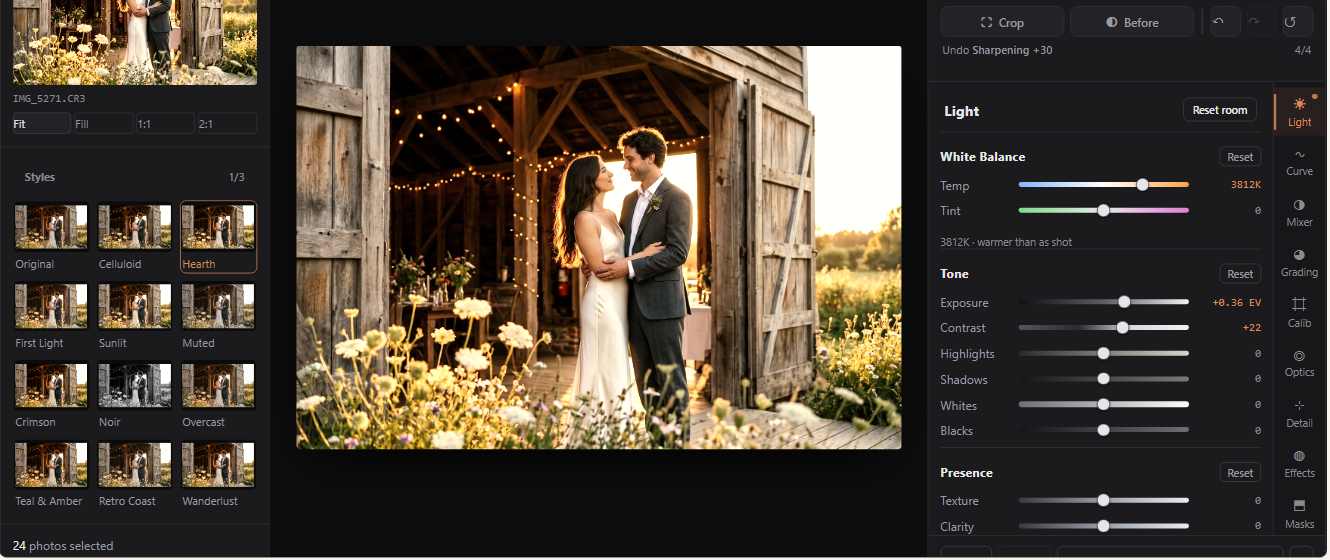
Plus subject, sky, person down to a single facial feature, depth range, radial, linear and brush, all of them updating on the photo while you drag.
ShotBreak Studio · For Windows and Mac
Cull a shoot, edit the keepers and export full-size files on your own computer. No subscription, ever.
 Opens the Microsoft Store in a new tab
Windows 10 or newer · certified by Microsoft, updates itself
Free for good. No account needed to edit.
Why it’s free
Why it’s free: we earn when you deliver client galleries through ShotBreak, never from the editor.
Switching from Lightroom
Your RAW files never move. Studio reads them where they sit on your drive and writes its edits to an XMP sidecar next to each file, not into a catalog you would have to get back out of.
Studio opens the folder where it sits. No import into a library, no new place to manage.
Each one is translated onto Studio’s own controls, so it arrives as a style you can preview and adjust. Tone, colour, curves and HSL come across.
Stars you saved in Lightroom come with it, and the stars you set in Studio are saved beside each photo, where Lightroom can read them too.
Import a single file or a whole pack, and bake any look back out as a .cube for Resolve, Premiere or Capture One.
They don’t travel inside a preset. Studio names what a preset left behind instead of quietly changing it, and you rebuild it with Studio’s masks.
The profile itself only exists in Lightroom. A preset built on one still imports, and Studio tells you its colours may sit a touch differently.
The work you already did on past photos stays in Lightroom. Most photographers switch on new work and leave finished jobs where they are.
Find your camera
Type your camera the way you’d say it. You’ll get a straight answer before you download anything.
The list comes from the RAW engine inside Studio, so it’s the same answer the app gives. Found a file it won’t open? Tell us which camera.
Depth
Masks that actually find the subject, colour you grab straight off the photo, real lens profiles, and retouching across a whole shoot.
01Masking
Plus subject, sky, person down to a single facial feature, depth range, radial, linear and brush, all of them updating on the photo while you drag.
02Color
Turn on Target range and the cursor becomes a loupe: it magnifies what sits under it and names the colour it would grab. Press, drag up or down, and every band in that colour’s range moves together.
03Optics
Studio reads the lens out of the file and pulls its measured profile: barrel distortion, corner falloff and colour fringing, gone before you touch a slider.
04Retouch across a whole shoot
Shot at f/11 all day? The same speck lands in the same place on every frame. Find it once, clear it everywhere.
SampleEverything else
Plus 30 built-in looks.
How it works
No library to set up and nothing to move. Open a shoot you already have and follow it through.
Studio opens the folder where it sits. No import into a library, no new place to manage. Stars you saved in Lightroom come with it.
Each burst becomes one stack with its best frame marked. You make every final call.
Full-size files to any folder you choose. Your stars are saved beside each photo, where Lightroom can read them too.

Our one promise
Studio develops on your machine. Your RAW files only reach us if you choose to archive them with us, and your finished photos only when you send them to a client.
Photos you deliver through ShotBreak stay yours. Nobody gets a license to them, for training or for anything else.
No opt-out buried in a settings page. No clause that turns this on in eighteen months.
From Studio to your client
Finished photos go from Studio straight into a client gallery in your brand. Your client opens one link on any phone, picks favorites and downloads. That part is ShotBreak, and you can start it free.
Specs and releases
Studio updates itself and tells you what changed.
The newest ShotBreak Studio, with the latest fixes and improvements. The app keeps itself up to date after you install it.
RAW development runs on the darktable engine.
問題
Yes, and it stays free. We make money when you deliver client galleries through ShotBreak. The editor has nothing to buy inside it.
No. Download it and start editing. You only sign in the first time you send photos to a client gallery.
Only the first time you open it, to pull down the develop engine and the on-device models. After that it runs with your Wi-Fi off. Block it in your firewall if you want to prove it.
No. Most of what ships with Studio finds things. Where the sky is, where a face is, what is near and what is far. It hands you a selection and you make the edit. The one place anything is created is Remove, and it only fills the gap you made, using that same photograph.
Search your body in Find your camera above. We list what we have tested, and what the decoder supports but we haven’t tested ourselves.
Your RAW files never move. Studio reads them where they sit on your drive and writes its edits to an XMP sidecar next to each file, not into a catalog you would have to get back out of. Your presets come across. The honest cost is the work you already did on past photos, which stays in Lightroom. Most photographers switch on new work and leave finished jobs where they are.
Yes. Studio reads Lightroom preset .xmp files and translates each one onto its own controls, so it arrives as a style you can preview on your photo and adjust. Tone, colour, curves and HSL come across. Brushes and gradients do not, and Studio names what a preset left behind instead of quietly changing it. You can import .cube looks too, single files or a whole pack, and bake any look back out as a .cube for Resolve, Premiere or Capture One.
In an XMP sidecar beside each RAW. Nothing is written into a catalog you would have to get back out of.
On Windows, Windows 10 (64-bit) or newer. On a Mac, macOS 12 or newer, on Apple Silicon or Intel; one download installs the right build. 8 GB of memory (16 GB recommended) and about 5 GB free once everything has landed. A graphics card is optional and speeds up masking.
On Windows, the Microsoft Store keeps it up to date. On a Mac, Studio updates itself and tells you what changed.
不會。現在不會、未來也不會。您的照片不是訓練資料,我們的條款明確說明。
閱讀完整承諾找不到您的問題?請聯絡我們。
support@shotbreak.com讓 Smart Select 為您整理連拍、編輯保留的照片,並隨意儲存。免費,運行於您的電腦上。
 ★★★★★
★★★★★ ★★★★☆
★★★★☆ ★★★☆☆
★★★☆☆ ★★★★☆
★★★★☆ ★★★★★
★★★★★ ★★★☆☆
★★★☆☆ ★★★★☆
★★★★☆ ★★★★☆
★★★★☆
 Fraser & June